
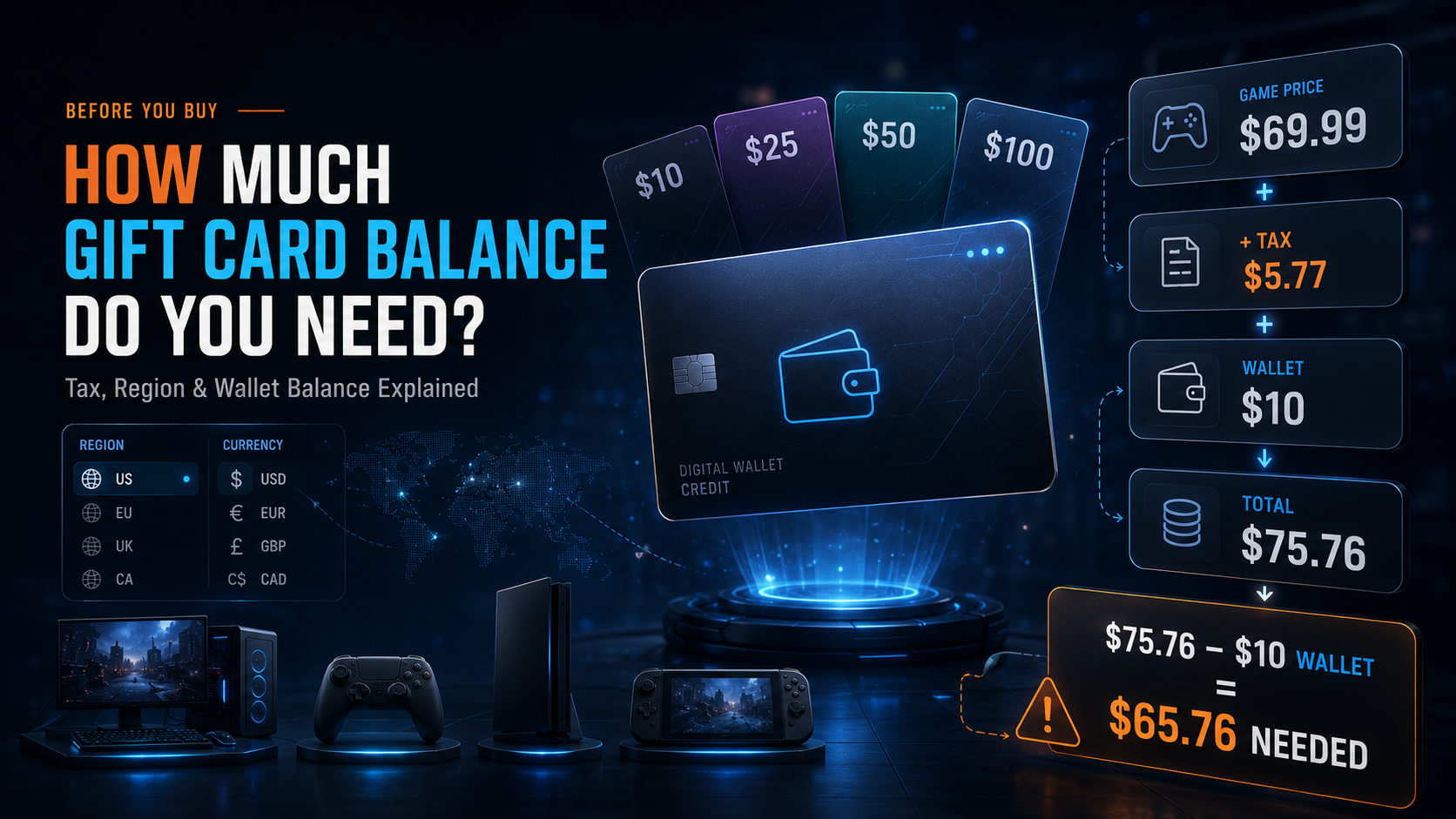
A game costs $69.99, so a $70 card should cover it—right? Not always. Tax may appear at checkout, your wallet may already contain credit, and the card’s currency or region may not match your gaming account.
That is why checking your gift card balance before buying matters. The safest amount is not always the price shown on the store page. It is the amount still due after tax, existing wallet funds, and platform rules are considered.
This guide explains how to calculate the right amount for Steam, PlayStation, Xbox, and Nintendo without guessing.
Quick Answer: How Much Gift Card Balance Do You Need?
Use this calculation:
Required gift card amount = final checkout total − current wallet balance
Add the game to your cart and continue to the review screen without confirming the purchase. Then round the amount up to the nearest available denomination.
For example:
- Game price: $69.99
- Final total: $75.76
- Existing wallet balance: $10
- Additional balance needed: $65.76
A $60 card would not be enough. You need at least $65.76 in compatible wallet credit.
Why the Listed Game Price May Not Be Enough
Tax may appear at checkout
The gift card purchase and the game purchase are separate transactions. Depending on the storefront, account location, and local rules, tax may be included in the displayed game price or added later.
Do not copy another player’s tax rate. Their account location may be different. The final review screen is the best place to check the actual total.
Region and currency can affect redemption
A USD, EUR, GBP, or CAD card is not automatically compatible with every account. Some platforms require the card’s country, region, or currency to match the account or wallet.
A cheaper code from another region is not a saving if it cannot be redeemed.
Gift cards use fixed denominations
The exact amount may not be sold as one card. If checkout shows $53.54, you may find only $10, $25, $50, or $100 options.
Use a valid combination or choose the next available value above the amount due. Rounding down can leave your wallet short.
How to Calculate the Right Gaming Gift Card Amount
1. Confirm the game and edition
Check whether you are buying the Standard, Deluxe, Gold, or Ultimate edition. Include DLC, in-game currency, upgrades, and subscriptions already in the cart.
The amount required for a base game may not cover a premium edition or an additional season pass.
2. Open the final checkout screen
Continue to the order review page without confirming payment. This reveals the complete price after discounts and any tax shown by the store.
3. Subtract your current wallet balance
If the final total is $44.99 and your wallet contains $12.50, you need another $32.49.
Checking your current gift card balance first helps you avoid buying more credit than necessary.
4. Match the platform, region, and currency
Compare the card with your account:
- platform
- account country
- store region
- wallet currency
- gift card region
- denomination
Do not assume that two countries using the same currency share the same voucher system.
5. Round up to a usable denomination
| Amount still due | Safer amount to add |
|---|---|
| $9.99 | $10 |
| $24.60 | $25 |
| $27.49 | $30 or a valid combination |
| $53.54 | $55, $60, or a valid combination |
| $75.76 | The nearest option above $75.76 |
Available values differ by platform, country, and seller.
How Tax Changes the Gift Card Balance You Need
Suppose a game is listed at $69.99 and an 8.25% tax applies:
- Listed price: $69.99
- Estimated tax: $5.77
- Estimated total: $75.76
A $70 card would not cover the purchase. Even a $75 wallet would be short by $0.76.
When checkout does not show the total, use this calculation:
Estimated total = listed price × (1 + tax rate)
This is only an estimate. Some stores include VAT in the listed price, while others add sales tax later. Use the actual checkout total whenever possible.
Platform Rules to Check Before Buying
PlayStation Gift Cards
PlayStation voucher codes must match the country or region of the PlayStation account. Sony recommends checking the account country before purchasing or redeeming a code.
Check both details before you buy PSN Gift Cards. A valid code from another PlayStation Store region may still fail to redeem.
Nintendo eShop Cards
Nintendo eShop Cards are tied to a country or region and must be used on an account set to the same location.
Nintendo also states that eShop funds do not carry over when the account country changes. You may need to spend or give up the remaining gift card balance before switching regions.
This makes denomination planning especially important before you buy Nintendo Gift Cards.
Steam Gift Cards
Steam may limit Wallet Code redemption based on the currency of the Steam Wallet. Check your Steam Account Details and the card requirements before you buy Steam Gift Cards.
If Steam Wallet funds do not cover the whole purchase, Steam can request another available payment method for the difference.
Xbox and Microsoft Gift Cards
An Xbox or Microsoft Gift Card adds funds to the associated Microsoft account. Microsoft states that currency-specific values may only be added to compatible accounts and that the resulting balance cannot be converted into another currency.
Microsoft can use the account balance first and charge the remainder to another available payment method. Do not rely on this unless your account has a supported backup option.
For a complete overview of redemption and wallet credit, read Everything You Need to Know About Xbox Gift Cards.
Three Quick Examples
One new game
Checkout total: $74.89
Current balance: $0
Required balance: at least $74.89
Compatible $50 and $25 cards would cover the purchase and leave $0.11.
A discounted game
Sale price: €19.99
Current balance: €6
Required balance: €13.99
A compatible €15 card would leave €1.01.
Several games during a sale
Three games cost $14.99, $9.99, and $24.99.
Add them to the cart, check the complete total, and subtract your wallet credit. This is more accurate than estimating each purchase separately.
What Happens to Leftover Gift Card Balance?
Unused credit normally stays in the platform wallet for future eligible purchases such as games, DLC, or in-game content.
However, wallet funds are not cash. They may be non-transferable, non-convertible, or affected by account-region rules. Nintendo can restrict country changes while funds remain, and Microsoft states that balance cannot be transferred or converted.
Buying slightly more than you need is safer than falling short, but avoid loading a large balance without a plan to use it.
Common Mistakes to Avoid
- buying a card equal to the listed price without checking checkout
- forgetting tax
- choosing the wrong currency or region
- ignoring existing wallet funds
- selecting the base-game amount for a premium edition
- confusing a wallet gift card with a game code
- relying on split payment without a backup method
- redeeming the code on the wrong account
A gift card adds wallet credit. A digital game code unlocks a specific product. Read the title and redemption details before paying.
Choose the Right Gaming Gift Card on TETHUB
Once you know the amount, choose a card that matches the platform, account region, and currency.
TETHUB offers digital options including Steam Gift Cards, PSN Gift Cards, Xbox Gift Cards, and Nintendo Gift Cards. Its product pages display the available denominations and request the email address used for digital delivery. Product details are sent after payment verification.
Before ordering:
- Check the final store total.
- Subtract the existing gift card balance.
- Confirm the platform, region, and currency.
- Select an amount that covers the difference.
- Review the email address and order details.
Players using crypto can also read how to buy gift cards with USDT safely. Players without an international bank card can review the guide to buy gift cards without a credit card.
Final Checklist
Before buying, confirm that:
- the game edition is correct
- the final checkout total is visible
- tax is included where applicable
- existing wallet funds were subtracted
- the card matches the account region and currency
- the denomination covers the full amount
- the delivery email is correct
A two-minute check can prevent a failed redemption or a second purchase for a small shortage.
Frequently Asked Questions
How much gift card balance do I need for a $70 game?
You need enough for the final checkout total. If tax is added, a $70 card may not cover a game priced at $69.99.
Should I include tax?
Include tax when it appears at checkout. Some stores include it in the listed price, while others add it later.
Can I combine more than one gift card?
You may be able to redeem more than one valid code into the same wallet, but account, currency, region, and balance limits can apply. Check the platform rules first.
Can I pay the remaining amount another way?
Steam and Microsoft support using wallet credit first and charging the remainder to another available payment method. Other stores and account setups may differ.
Does the gift card currency need to match my account?
The safest choice is a card listed as compatible with your account country, store region, and wallet currency.
Is it better to buy slightly more than I need?
Yes. Rounding up to the nearest usable denomination is safer than rounding down.